How-to guide
How to write a project report with AI
A project report answers one question for one reader: where does the project stand, and what do you need from them? A status report for a steering committee, a monthly progress report for a client and a final report at the end of a project are three different documents, even when the data underneath is the same.
Free: 1 document, plan up to 12 pages, first 3 built, no credit card. Plans from €7.99/mo
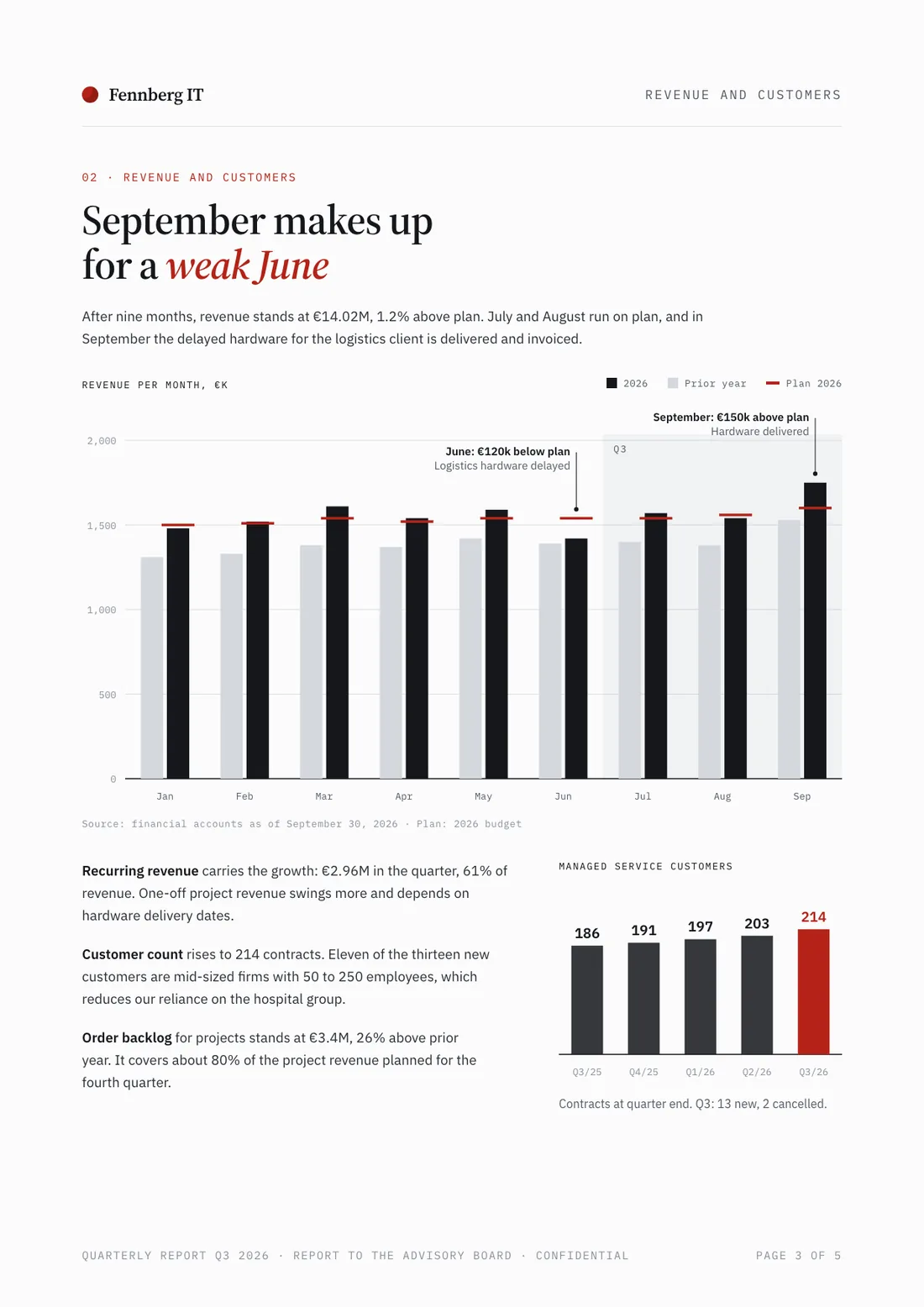
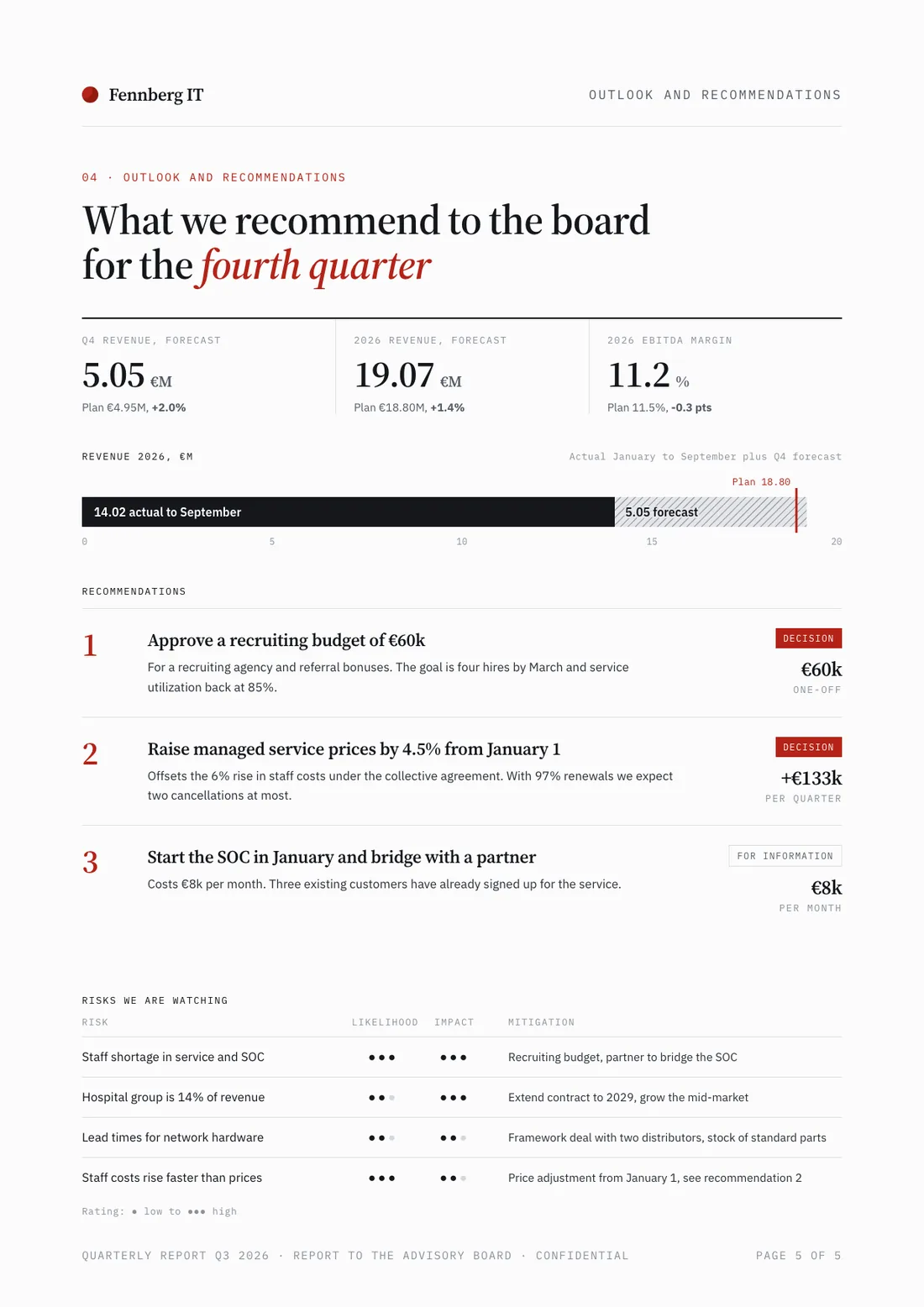
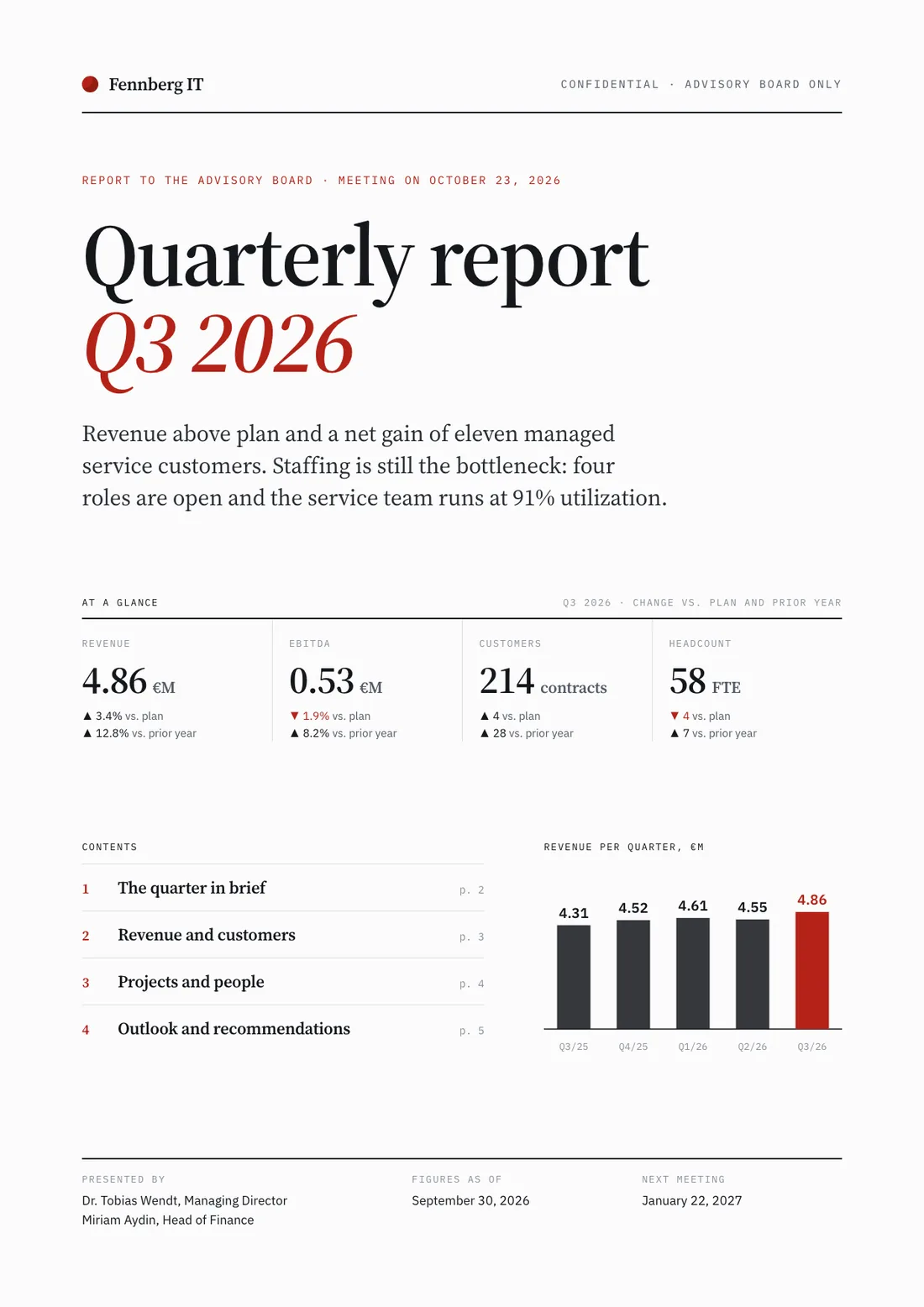
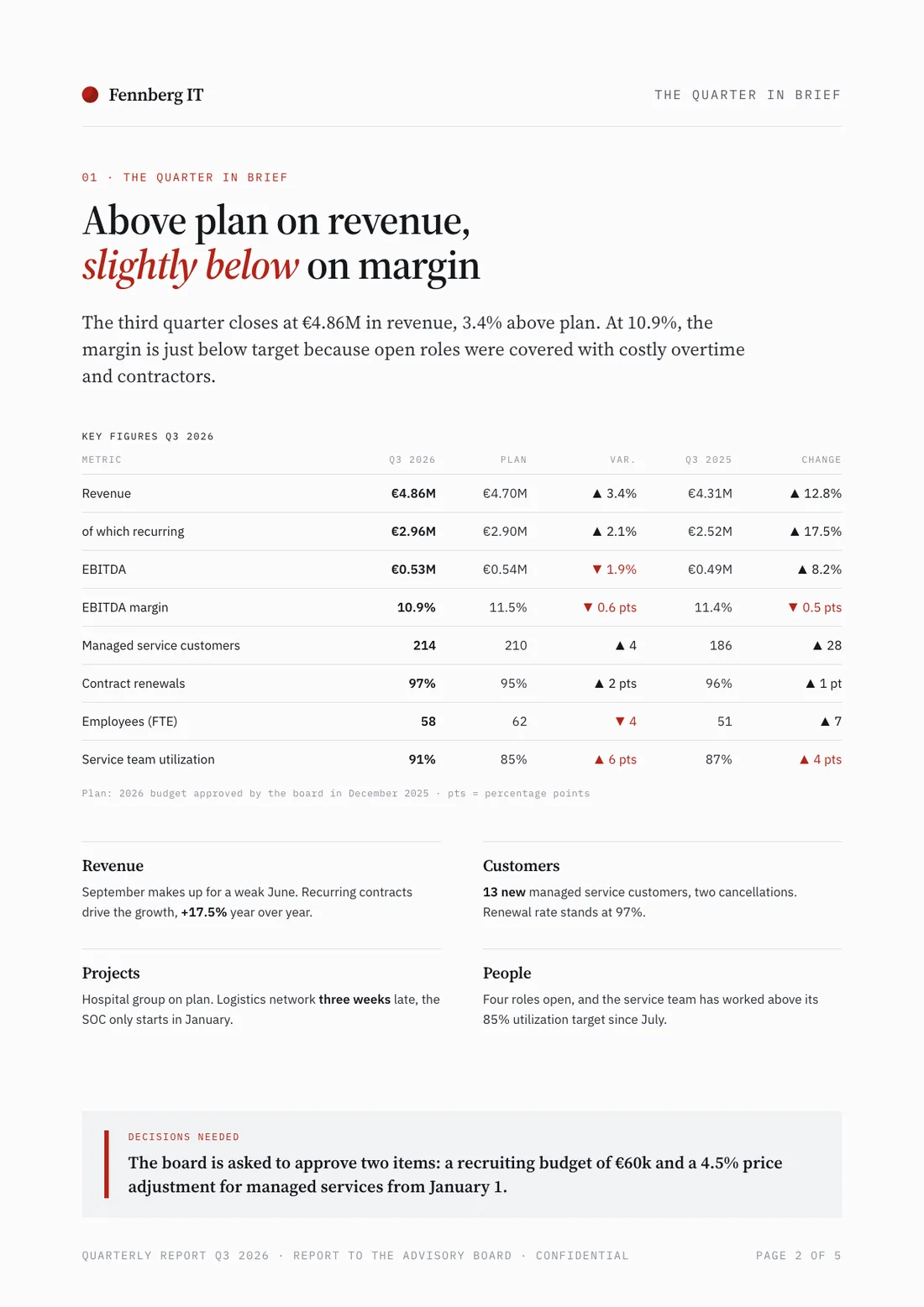
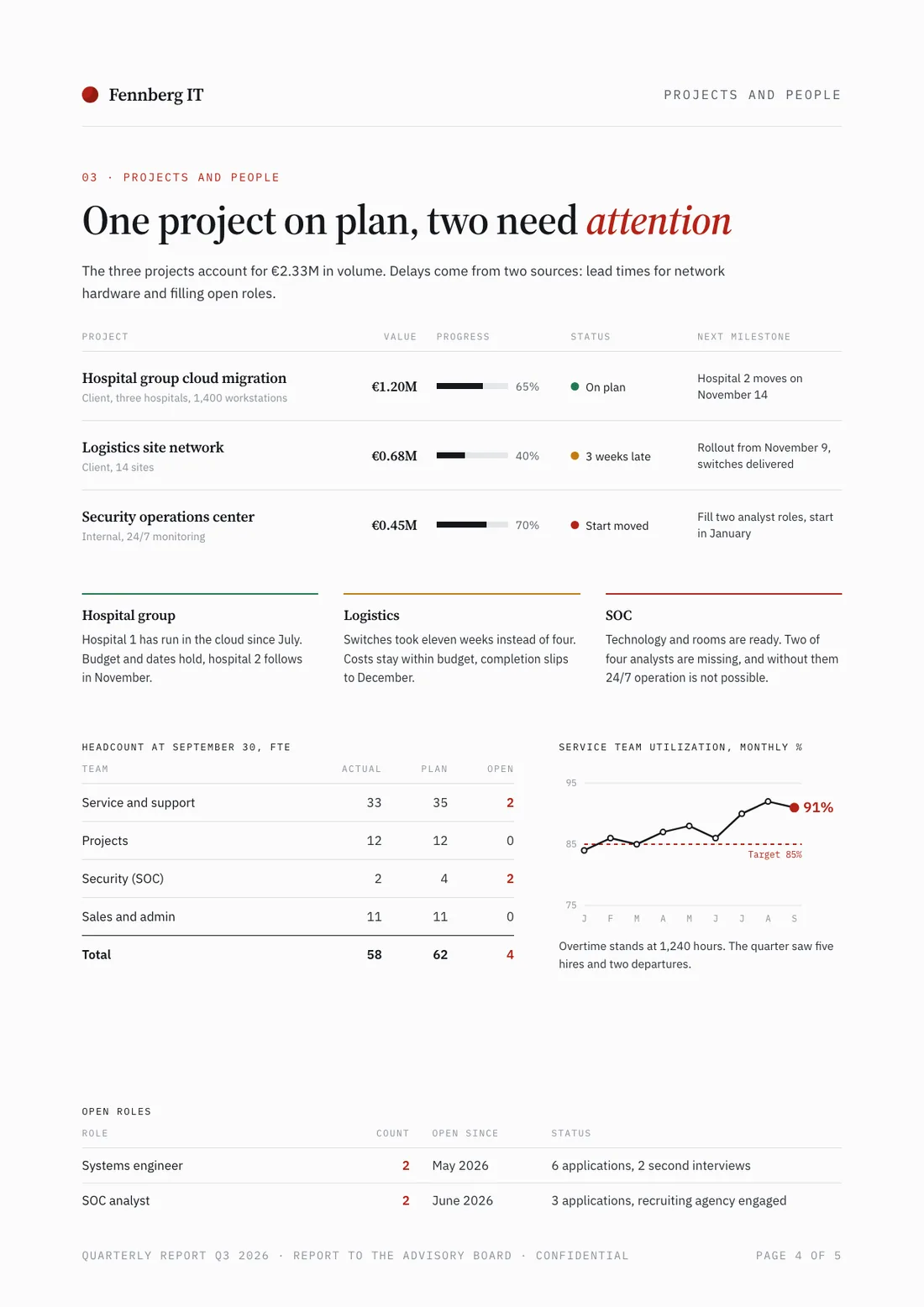
Example report for a fictional company. Names and numbers are sample valuesSee all 5 pagesExample in detail
To write a project report with AI, name the reader and the type of report (status, progress or final), then attach the project plan, the budget and your notes. Slaide drafts the sections: status by milestone, budget against plan, risks and issues, and the decisions you need, then exports a Word file or a PDF. You check every figure against your plan before the report goes out.
Project methods agree on the shape. PRINCE2's highlight report goes to the project board each period and covers progress, issues, risks and what comes next; the end project report compares what was delivered with what was planned. Whatever your method, the reader wants status, budget, risks and decisions on one to three pages, not a diary of the month.
AI drafts the structure and the prose in minutes, so your time goes into judgement: which status colour is honest, which variance matters and which decision you need. Attach the plan, the budget and your notes, say who reads the report, and review the result for accuracy rather than style.
What a finished result looks like
Every page below was designed as a real deck: layout, charts and copy. Click a page to see it large.
Example report for a fictional company. Names and numbers are sample values
Step-by-step: how to build a project report with AI
Pick the report type and the reader
A status report covers one period for a steering committee or sponsor: overall status, decisions needed, top risks. A progress report tells a client what was done against the plan. A final report closes the project: deliverables against objectives, budget outturn, lessons learned and handover. Name the type and the reader in your first sentence, because they decide length, tone and what you leave out.
Attach the plan, the budget and your notes
Upload the milestone plan or task list (export it from your project tool as Excel or CSV), the budget with actuals, the risk log and your own notes on what changed. Slaide has no built-in connection to project tools, it reads the files you attach. If two files disagree, say which one is the source of record, and give the reporting period.
Show status by milestone, with a colour you can defend
One row per milestone: planned date, forecast date, status and a one-line reason. Use the colours with a rule the reader knows: amber is a variance with a recovery plan, red is a variance that needs a decision. A report that is green until the week it turns red teaches readers to ignore the colours.
Add a milestone table: planned date, forecast date and status (green, amber, red) for each milestone, with one line on why each amber or red milestone has slipped and what the recovery plan is.
Put budget against plan in one table
Approved budget, spent to date, forecast at completion and the variance. The forecast matters more than the spend so far: 40 percent spent says little until it is set against how much of the work is done. Say how the forecast was built, for example from open orders plus estimated remaining effort.
Add a budget table: approved budget, spent to date, forecast at completion and variance in euros and percent. Add two sentences on what drives any variance above 5 percent.
List the top risks and issues, each with an owner
Three to five items, not the whole log. For each: what could happen or has happened, the impact, the mitigation, the owner and the date. An issue is a risk that has already happened, so it needs an action now rather than a watch.
End with the decisions you need
State each decision, who takes it, by when, and what happens if it is late. Put the same decisions in the summary on the first page, because many readers stop there. 'Approve two extra weeks of testing by 17 October' is a decision; 'testing is under review' is not.
Close with a decisions section: each decision as one sentence, the person who decides, the date it is needed and the consequence of a delay. Repeat the decisions in the summary on page one.
Check the numbers, then export for the reader
Compare every date, amount and status with your source files before the report goes out: Slaide writes from your material, and a wrong input makes a confident wrong sentence. Export Word if others will edit or comment, PDF for circulation. For a recurring report, keep the same sections every period and attach the new period's data with last period's report, so readers can compare.
Status, progress and final report: which one do you need?
The three share data but not purpose. Pick by the reader's question.
| Report | Reader | Covers | Usual length |
|---|---|---|---|
| Status report | Steering committee, sponsor | Overall status, milestones, budget forecast, top risks, decisions needed | One to three pages |
| Progress report | Client, department heads | What was done in the period against the plan, what comes next, open points | Two to four pages |
| Final report | Sponsor, steering committee, the next team | Deliverables against objectives, budget outturn, lessons learned, handover | Four to ten pages, depending on the project |
Methods name these differently: PRINCE2 calls the periodic report a highlight report and the closing document an end project report. The content is the same.
What a project status report contains
A structure you can reuse every period, with where each part comes from.
| Section | What goes in | Where the data comes from |
|---|---|---|
| 1Summary and overall status | Status colour, two or three sentences, the decisions you need | Your judgement, written last |
| 2Milestones | Planned and forecast date, status colour, reason for any slip | Project plan or task export |
| 3Budget | Approved budget, spent to date, forecast at completion, variance | Budget file with actuals |
| 4Risks and issues | The top three to five, each with impact, mitigation, owner and date | Risk log |
| 5Decisions and next steps | Each decision with who decides and by when | Your notes |
| 6Next period | What will be done before the next report | Project plan |
How to create a project report with AI: prompts for three situations
Fictional projects and numbers; swap in your own facts and attach your files.
Monthly status report for a steering committee
Write the October status report for the steering committee of the new customer portal project at Brunnfeld Versicherung (fictional). Reader: the sponsor and the heads of sales and IT. Three pages. Attached: milestone plan, budget with actuals, risk log. Status green overall, one amber milestone: the payment integration is one week late. Budget €240,000, €118,000 spent, forecast €241,000. Include milestone and budget tables, the top three risks with owners and the one decision we need.
Start with this promptProgress report for a client
Create the monthly progress report for our client Seehausen Möbel GmbH on the relaunch of their online shop. We are the agency Nordlicht Digital (fictional). Period: September. Done: checkout redesign live, 14 of 22 category pages migrated. Next: remaining category pages, product filter, redirects. Open points for the client: product photos for 3 ranges, sign-off on the filter wording. Two pages, plain language, ending with what we need from the client and by when.
Start with this promptFinal project report
Write the final report for the office relocation project at Tannenberg Steuerberatung (fictional), closed on 30 September. Compare the delivered scope with the objectives in the attached project order, show the budget outturn (€64,000 approved, €67,200 spent) and explain the variance, list five lessons learned and the open points handed over to facility management. Six pages, for the managing partners.
Start with this prompt
Where to go next
- AI report generator
Describe the report, attach your data and get a finished Word or PDF report.
- Best AI tools for reports
How the tools that write reports compare on output, export and price.
- How to write a board report with AI
For the governance audience: performance against plan, risks, decisions.
- Bericht mit KI erstellen (Deutsch)
Monats-, Quartals- und Projektberichte aus Excel und PDF.
Common mistakes to avoid
FAQ
Anything missing? Ask us
Can AI write a project status report?
Yes, if you give it the facts. Slaide drafts a status report from your plan, budget and notes: summary, milestones, budget against plan, risks and decisions. It cannot know how your project is really going, so the status colours, the reasons for variances and the decisions you ask for are your judgement, and every figure should be checked against your files.
What should a project status report include?
Overall status with a colour, the milestones with planned and forecast dates, the budget with a forecast at completion, the top risks and issues with owners, the decisions you need and what happens next. Keep it to one to three pages and put the decisions on the first page.
What is the difference between a status report, a progress report and a final report?
A status report gives a steering committee or sponsor the current position and the decisions needed. A progress report tells a client what was done in a period against the plan. A final report closes the project with deliverables against objectives, the budget outturn, lessons learned and the handover.
Which AI tools can generate project reports?
Slaide, Microsoft 365 Copilot, ChatGPT and Claude can write the report document from your files and notes. Project tools such as Asana and ClickUp have AI that drafts updates inside the tool. Our comparison of AI tools for reports sets out what each produces and where each is the wrong choice.
Does Slaide connect to Jira, Asana or Microsoft Project?
No, Slaide has no built-in connection to project tools. You export the plan or task list as Excel or CSV and attach it with the budget and your notes, and Slaide reads the files you attach.
Can AI automate a recurring project report?
Partly. Each Slaide report is built from the files you attach for that run: for a monthly report you attach the new period's data and last period's report, say which structure to keep, and get a new finished document, usually within a few minutes. Slaide does not refresh a report by itself from a database or a project tool.
How long should a project status report be?
One to three pages. The first page should carry the overall status, the decisions you need and the top risk, because many readers stop there. Put detail such as the full risk log in an appendix.
Build your project report with Slaide
Describe what you need and Slaide plans, writes, designs and self-checks the whole thing. Free to start, no credit card.