AI report generator: describe it, get the finished report
A useful report tells a reader what changed, why it matters and what action follows. Raw notes and spreadsheets rarely arrive in that order. Slaide plans the sections, writes the explanation, designs the pages and checks the layout. The example report on this page is fictional; it shows the kind of output to review, not a real customer's results.
Free: 1 document, plan up to 12 pages, first 3 built, no credit card. Plans from €7.99/mo
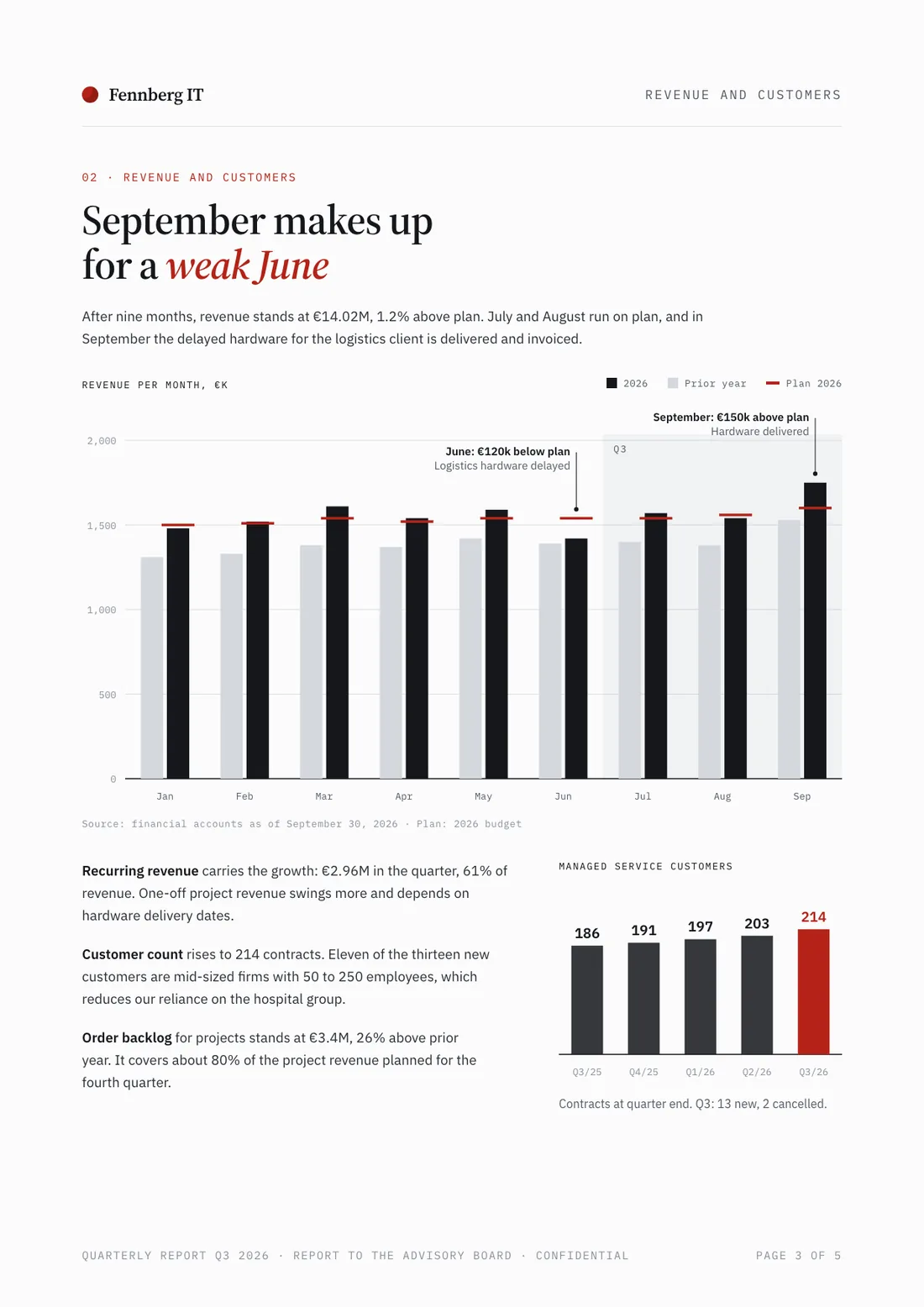
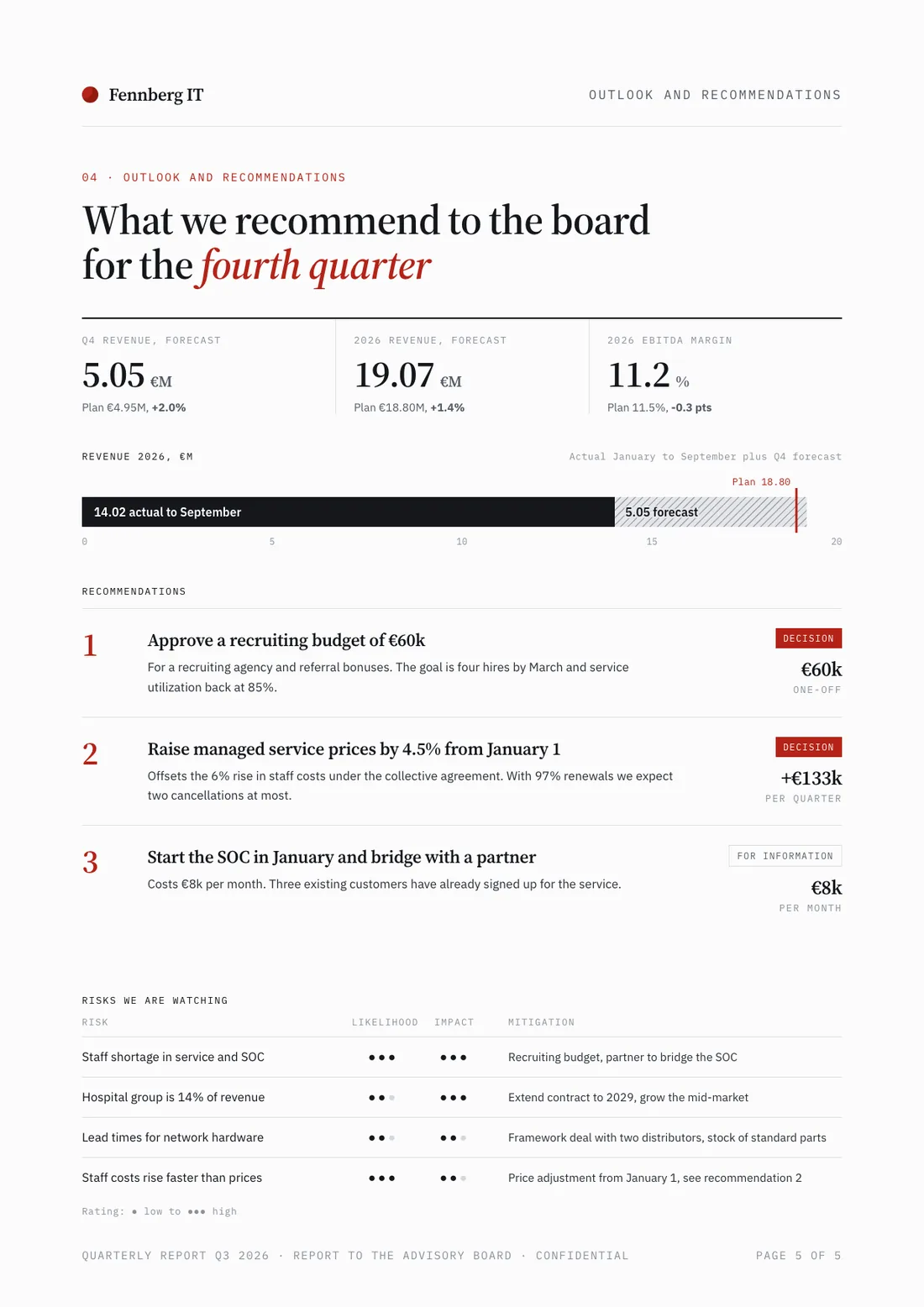
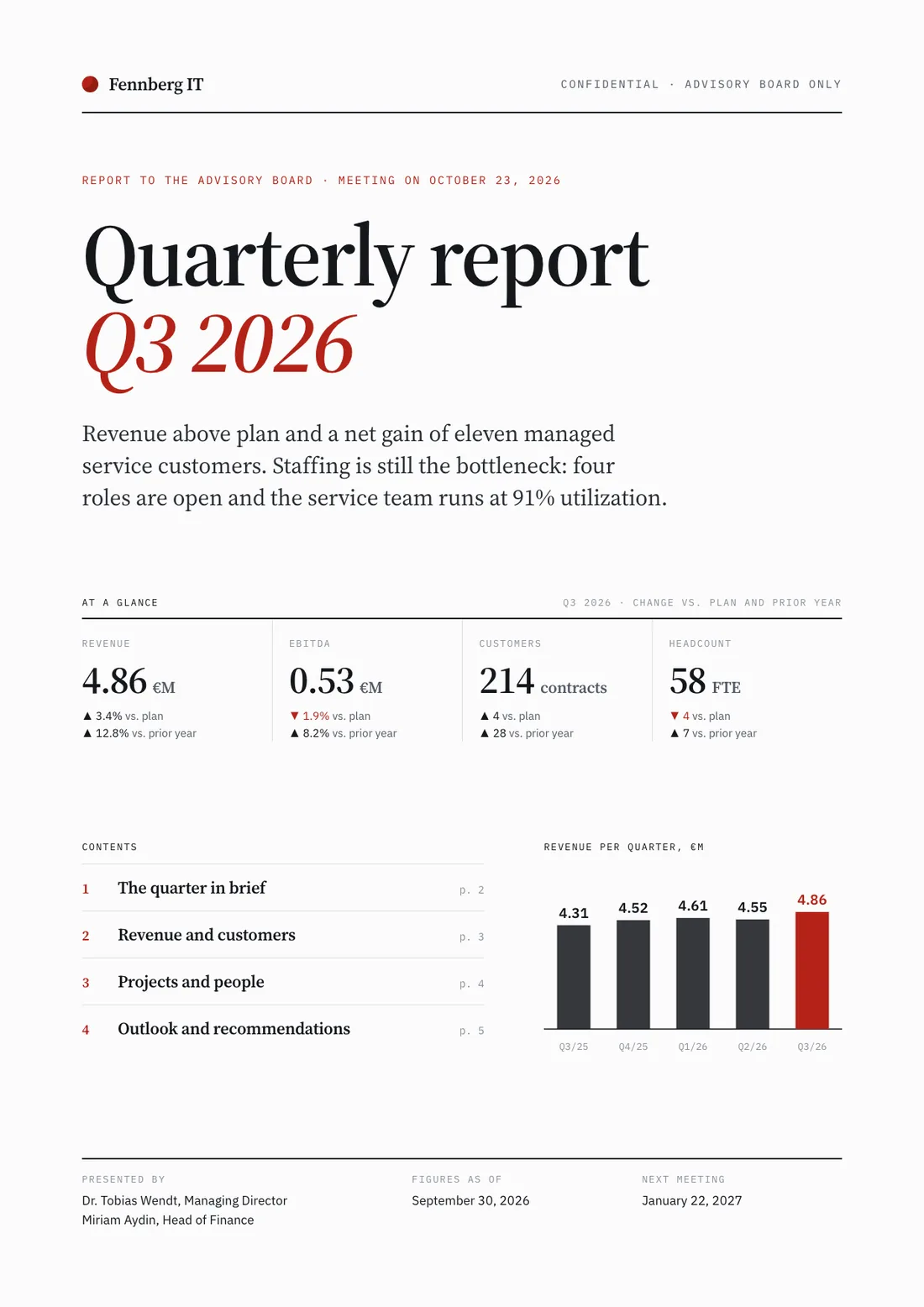
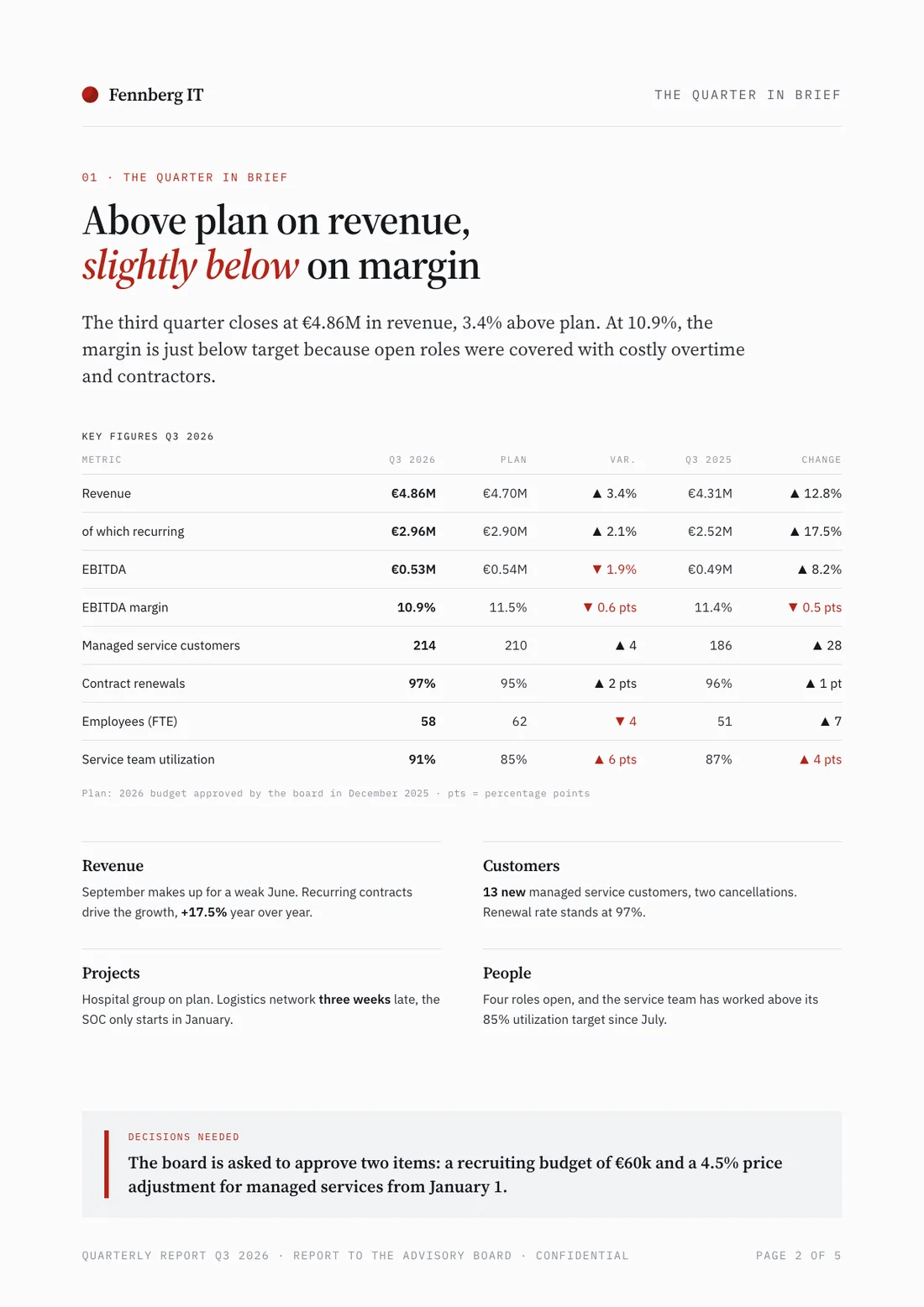
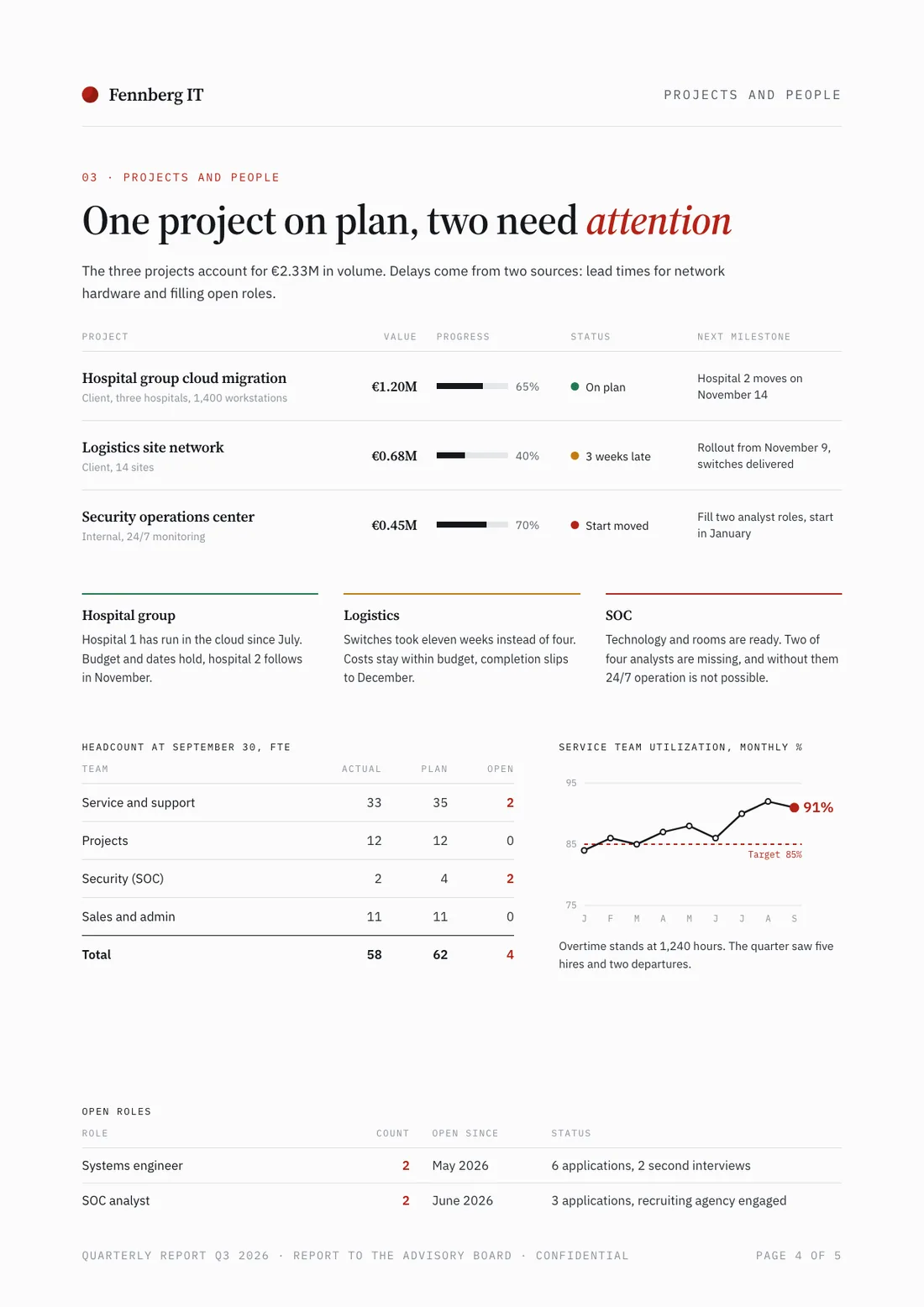
Example report for a fictional company. Names and numbers are sample valuesSee all 5 pagesExample in detail
Slaide is an AI report generator for monthly reports, board updates and client deliverables: describe the reader and the decision, attach Excel, CSV, PDF or Word files if you have them, and it plans the sections, writes them and designs the pages with charts and tables. It checks each page's layout, and you export an editable Word document or a fixed PDF. Review its conclusions against your evidence before you send it.
Start from a description or attach Excel workbooks, CSV exports, PDFs, Word documents, PowerPoint files, images and notes. Tell Slaide which figures are final, what period they cover and who will read the result. It can search the web for current context, but any external number used in a business report still needs a checked source and date.
What a finished result looks like
Every page below was designed as a real deck: layout, charts and copy. Click a page to see it large.
Example report for a fictional company. Names and numbers are sample values
What Slaide does
Complete reports, planned and written
Slaide plans the sections, writes the draft and designs the pages. You review the analysis and decide what can be sent.
Visual hierarchy, charts and callouts
Headings, charts and callouts help readers find the decision and its supporting evidence instead of searching a wall of text.
Editable Word and fixed PDF exports
Word exports use native headings, paragraphs, lists and tables. PDF is suited to a fixed version for circulation; charts in Word are images.
Reads your data and documents
Attach Excel or CSV files, PDFs or Word documents. Slaide uses your material as context; compare every reported number with its source before sharing.
Web search for live context
Slaide can research current context before writing. Add citations to the report where a reader needs to verify an outside claim.
Self-checks before delivery
Slaide renders and reviews each page, fixing layout issues it identifies. Its visual check does not replace your review of data and conclusions.
How it works
Describe the report
Name the reader, reporting period, decision and required sections. Say which questions the report must answer and which figures may not be estimated.
Add your data and files (optional)
Upload spreadsheets, CSV exports, PDFs, Word documents or meeting notes. Identify the source of record if older and newer files disagree.
Slaide generates
Slaide plans, writes, designs and checks the page layouts. Read the findings and verify the numbers before anyone relies on them.
Edit and export
Click text to edit it or ask the AI for a focused revision. Export a Word document for further writing or a PDF for a fixed handout.
Business report structure: from evidence to decision
A board report and a client report may use different language, but both should let the reader trace a conclusion back to evidence. This outline is a writing aid, not a mandatory template.
| Section | Question for the reader | Material to prepare |
|---|---|---|
| Executive answer | What changed and what decision is requested? | One plain conclusion, its scope and the recommended action. |
| Period and method | What does the report cover? | Date range, definitions, included teams or customers and data limitations. |
| Results | What happened against the plan? | A small set of comparable measures with units and prior periods. |
| Drivers | What is known about the causes? | Operational observations, customer evidence and alternative explanations. |
| Risks and options | What could change the recommendation? | Assumptions, tradeoffs, dependencies and a realistic alternative. |
| Decision and follow-up | Who does what next? | Owner, next action, review date and the signal that would trigger a change. |
AI report generator from Excel, CSV, Word and PDF
Attach an Excel workbook or a CSV export for measured results, a Word memo for interpretation and a PDF for the original project brief. Tell Slaide which file contains approved figures and which is context. If the files disagree, ask it to flag the discrepancy for you rather than averaging or silently choosing one version.
A chart should name its metric, unit, population and period. A quarter-over-quarter comparison is meaningful only if both periods use the same definition. If the workbook lacks a denominator or the source does not explain a change, say so in the report. These checks are especially important when an AI writer can turn uncertain data into confident prose.
Charts and tables that help a report reader
Choose a visual for a question, then verify every label against the source. More graphics are not automatically more informative.
| Question | Useful form | Check before sharing |
|---|---|---|
| Did performance change? | A small trend chart with a consistent time scale. | Period, units, baseline and any missing observations. |
| What drove the result? | A comparison table or a chart of the main contributors. | Whether categories overlap or leave out a material part. |
| What could go wrong? | A risk table with likelihood, impact and owner. | Whether the ratings are judgement rather than measured facts. |
| What should happen next? | A short action table with owners and dates. | That each action connects to a finding in the report. |
In Word exports, headings, paragraphs, lists and tables remain native content. Charts are placed as images, so retain the original workbook if a recipient must update a chart.
Export a report to Word, PDF or PowerPoint
Choose .docx if a colleague will rewrite the conclusion, add comments or update a table. The exported Word file contains real headings, paragraphs, lists and tables that can be edited as document content. Charts are images in that export, so a Word recipient cannot change their data by double-clicking the chart.
Choose PDF when the page design should remain fixed across recipients. If you will present the findings, ask for the report as slides: a slide document exports to PowerPoint. When the numbers belong in a working table, ask for a spreadsheet as well; Slaide creates a real .xlsx with formulas.
Report prompts for monthly, market and client reports
Fictional companies with sample numbers. Use your own approved figures and make open questions explicit.
Monthly management report
Write a monthly management report for Brightline Bakeries, a fictional chain of 14 bakeries, for August. Revenue €1.08 million against a plan of €1.12 million, staff costs 34 percent of revenue, two stores below target. Include a KPI table, a revenue chart by store, three issues and actions with owners.
Start with this promptMarket analysis
Write a market analysis of demand for heat pump installation in Bavaria for Hofmann Haustechnik, a fictional installer that wants to grow. Research current figures on the web and list the sources in a table at the end. Cover demand drivers, competitors, typical prices and three options for the next two years.
Start with this promptClient project report
Create a client project report for Feldwerk Tools, a fictional manufacturer, on the rollout of its repair booking service. Status: 7 of 9 milestones done, launch moved by two weeks, 212 bookings in the pilot. Show delivered work, open issues, decisions needed from the client and the next milestone.
Start with this promptQuarterly sales report
Prepare a quarterly sales report for HarborLedger, a fictional software company. Q3: 46 deals won, €312,000 in new annual revenue, 23 percent win rate, 41-day sales cycle; Q2: 38 deals, €268,000, 21 percent, 45 days. Compare the quarters in a chart and end with two recommendations for Q4.
Start with this prompt
Report writing errors to catch
AI report generator pricing
Start one document without a credit card. Choose a paid plan when you need more finished pages or a clean export.
How business report files are handled
Related reports and document workflows
- Best AI tools for reports
Compare different kinds of reporting tools before choosing a workflow.
- AI document generator
Build other finished business documents from a brief and source files.
- AI presentation maker
Present the report's decision and evidence as slides.
- How to write a board report
What directors need on each page, step by step.
- Slaide for consultants
Turn client findings into proposals, updates and deliverables.
FAQ
Anything missing? Ask us
What kinds of reports can Slaide make?
Monthly and quarterly management reports, board updates, market analyses and client project reports, among others. Name the reader, period and decision, then attach your source material. Review conclusions before circulation.
Can ChatGPT write a report, and how is Slaide different?
ChatGPT can draft and revise report text, and ChatGPT Work creates editable documents, spreadsheets and presentations, depending on your plan. Slaide plans, writes and designs the pages, checks their layout and exports Word or PDF. Verify figures, methods and external sources either way.
Which files can I attach to a report?
Excel (.xlsx), CSV, PDF, Word (.docx), PowerPoint (.pptx), images and text notes. Identify the file with approved figures when versions conflict. Older .xls and .doc files need to be saved in the current format first.
Can I edit the report in Word?
Yes. The .docx has native headings, paragraphs, lists and tables. Charts are images in Word, so keep the data if colleagues must revise them. Use PDF for a fixed layout.
Can Slaide make charts and data tables?
Yes. It builds charts, callouts and tables from the figures you supply and can create a spreadsheet with working formulas as a real .xlsx. Check units, periods and calculations. Word tables remain editable, while charts appear as images.
Can Slaide generate a project report?
Yes. Attach the project plan or task export, the budget with actuals and your notes, and say whether it is a status, progress or final report. Slaide writes the summary, the status by milestone, budget against plan, the risks and the decisions you need, then exports Word or PDF. Slaide has no built-in connection to project tools: it reads the files you attach, and you check the figures before the report goes out.
Which AI report generator is the best?
It depends on the report. Slaide is built for a finished, designed report from your own files as Word or PDF, Microsoft 365 Copilot drafts inside Word, and ChatGPT writes long drafts you format yourself. Our comparison of AI tools for reports covers nine tools and says where each one is the wrong choice, Slaide included.
How long does an AI report take?
A short report is usually ready in a few minutes, and Slaide shows each step while it works. Web research, long files and more pages add time. Allow separate time to validate findings and approve the wording.
How many pages can the report have?
You set the length in your brief. Plus builds up to 12 pages per document, Pro and Max have no page limit, and the free plan plans up to 12 pages and builds the first 3.
Does the free report have a watermark?
Yes, free exports carry a small Slaide badge; Plus, Pro and Max do not. Check the exported file before sending a client deliverable.
What does the AI report generator cost?
Free covers one document: Slaide plans all pages and builds the first 3, no credit card. Plus costs €7.99 a month, or €5.99 a month billed yearly, and exports without the badge; Pro and Max have no page limit.
How does Slaide handle confidential report data and GDPR?
Accounts, uploads and documents are stored with Supabase in the EU. To generate, the needed content goes through OpenRouter in the USA to the language model, and training on customer content is contractually excluded. Transfers rely on the EU-US Data Privacy Framework, otherwise on the EU's standard contractual clauses.
AI Report Generator, try it free
Describe what you need and Slaide plans, writes, designs and self-checks the whole document. Free to start, no credit card.