Product help
Files and exports: what Slaide reads and what you get
Bring your own material as context or import a deck to edit it. At the end, download the format your next step needs: PowerPoint, Word, PDF, images or an Excel model.
Free: 1 document, plan up to 12 pages, first 3 built, no credit card. Plans from €7.99/mo
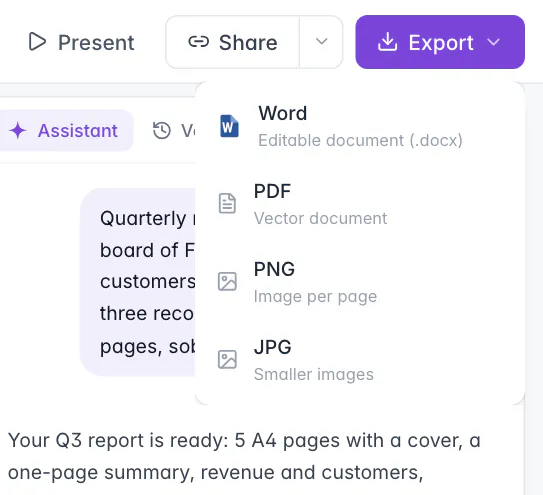
Slaide reads PDF, Word (.docx), Excel (.xlsx), PowerPoint (.pptx), images and text files as context, up to 30 MB per file. It exports presentations as editable PowerPoint, page documents such as A4 reports as Word, and every document as PDF, PNG or JPG. Excel models it builds download as .xlsx with working formulas.
Files you can add as context
Attach files to a request when the document should use your material. Slaide reads them; nothing is filled into a fixed template.
| File | Extensions | What Slaide does with it |
|---|---|---|
| Reads the text and can look at single pages as images, for example a table or a chart in a report. | ||
| Word | .docx, .dotx | Reads the text and structure as source material. |
| Excel | .xlsx, .xlsm, .xltx | Reads the sheets and their values, for example figures for a report or a deck. |
| PowerPoint | .pptx, .potx | Reads the slides as source material and can look at them as images. |
| Images | .png, .jpg, .gif, .webp, .svg | Sees the image and can place it on a page, for example a product photo or a logo. |
| Text and data | .txt, .md, .csv, .tsv, .json, .html and more | Reads the content as text. |
Each file can be up to 30 MB, and you can add up to 10 files at a time and up to 100 per document. Files with unknown extensions are read as text. The old binary formats .doc, .xls and .ppt are not read: open them in Word, Excel or PowerPoint and save them as .docx, .xlsx or .pptx first.
Context is optional. A brief without any file works, and links in your first request are read as well. Files are useful when the facts must come from you: your figures, your offer, your earlier report.
Import a deck to edit it
Context is material for something new. Importing turns an existing PowerPoint or PDF into pages you edit in Slaide.
When you import a PowerPoint or a PDF, Slaide rebuilds its slides or pages as editable pages in the editor. You can then change text directly, ask for changes to single slides and export the result again.
How many pages are imported depends on the plan: the first 3 on Free, up to 12 on Plus, and on Pro and Max the whole file without a plan limit, apart from a technical cap for very large files. If a file is longer than your plan allows, Slaide imports the first pages and tells you how many are left.
On paid plans, slides you did not change leave the PowerPoint export exactly as they were in your original file, byte for byte. Only changed slides are drawn anew.
Export formats
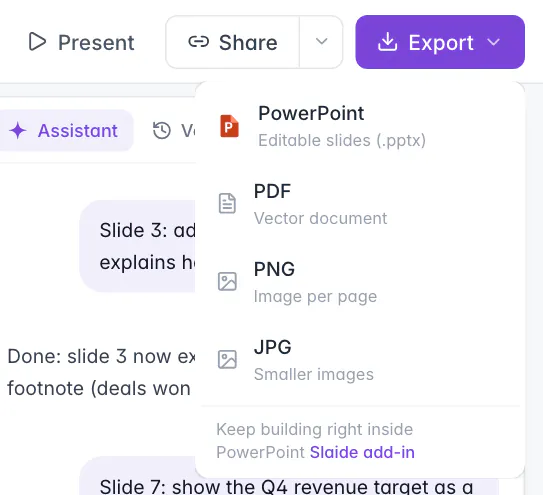
Export sits at the top right of the editor. The menu shows the Office format that fits the document.
| Format | Available for | What you get |
|---|---|---|
| PowerPoint (.pptx) | Slide formats such as 16:9 | Editable text boxes with native bullets, shapes, pictures and speaker notes. Charts become editable shapes or an image, not PowerPoint chart objects. |
| Word (.docx) | Page formats such as A4 | Real headings, paragraphs, lists, tables and images on A4 pages. Charts become images. |
| Every document | A vector PDF that looks like the editor. | |
| PNG | Every document | One image per page. Several pages download as a ZIP file. |
| JPG | Every document | Smaller images, one per page, several as a ZIP file. |
| Excel (.xlsx) | Excel models Slaide builds | A workbook with working formulas and formatting. No native Excel charts, pivot tables or macros. |
All formats download directly, without a print dialog. The Excel file is not in the export menu: an Excel model appears as an attachment of the document, and you download it from its menu.
Which Office format you get follows the page format, not the content. If you need a presentation as Word or a report as PowerPoint, choose the other format in the page plan, or ask Slaide in a request to change the format of the document.
Which file for which next step
Choose by what happens with the file after you send it.
| Next step | Best format | Why |
|---|---|---|
| You present in a meeting from your laptop | PowerPoint or PDF | PowerPoint if you still want to change slides, PDF if the deck is final. |
| A colleague revises the text of a report | Word | Headings, lists and tables reflow as they edit. |
| You send an offer or a report to a client | Looks the same on every device and cannot be changed by accident. | |
| You post a slide on LinkedIn or in a chat | PNG or JPG | One image per page, JPG for smaller files. |
| Your accountant needs the figures | Excel | A workbook with working formulas instead of a picture of a table. |
An Excel model also opens in the editor as a grid. Select a cell to edit its value or formula, or ask Slaide to change the sheet, then download the updated workbook from its attachment.
Free and paid exports
The only difference in the file itself is the small mark on free exports.
On the free plan your first document is planned with up to 12 pages and its first 3 are built. Its exports carry a small Slaide mark: on the page in PDF, PNG, JPG and PowerPoint, as a footer line in Word.
Paid plans start at €7.99 a month. They export without the mark and build every planned page up to the plan limit.
Limits
What the file handling does not do.
FAQ
Anything missing? Ask us
Can Slaide use a PDF, Word, Excel or PowerPoint file?
Yes. Attach the file to your request and Slaide reads it as context: PDF, Word (.docx), Excel (.xlsx) and PowerPoint (.pptx), plus images, CSV, Markdown and other text files. Up to 30 MB per file and 10 files at a time. Old .doc, .xls and .ppt files have to be saved in the current format first.
Which formats can I export?
Presentations export as PowerPoint (.pptx), documents in page formats such as A4 as Word (.docx). Every document also exports as PDF, PNG or JPG. If Slaide built an Excel model, you download it as an .xlsx file with working formulas from its attachment in the editor.
Why do I see PowerPoint but not Word in the export menu?
The export menu offers the Office format that fits the document: PowerPoint for slide formats, Word for page formats such as A4. A presentation therefore offers PowerPoint, a report on A4 offers Word. PDF, PNG and JPG are always there.
Does Slaide keep the layout of a PowerPoint I import?
An imported deck is rebuilt as editable pages in Slaide. When you export it again on a paid plan, slides you did not change come out of your original file byte for byte, and only changed slides are drawn anew. On the free plan the first 3 slides are imported.
Are free exports marked?
Yes. Free exports carry a small Slaide mark: on the page in PDF, PNG, JPG and PowerPoint, as a footer line in Word. Paid plans from €7.99 a month export without it.
Start from a brief or from your own files
Your first document is free, with the first 3 pages built and exports to PowerPoint, Word or PDF.