3D objects
3D models for PowerPoint, built from a single sentence.
Describe what people should see: a product, a machine, a building. Slaide models the object, places it on your slides and delivers it as a real 3D model you rotate in PowerPoint.
On the Pro and Max plans. One object costs about 130 credits.
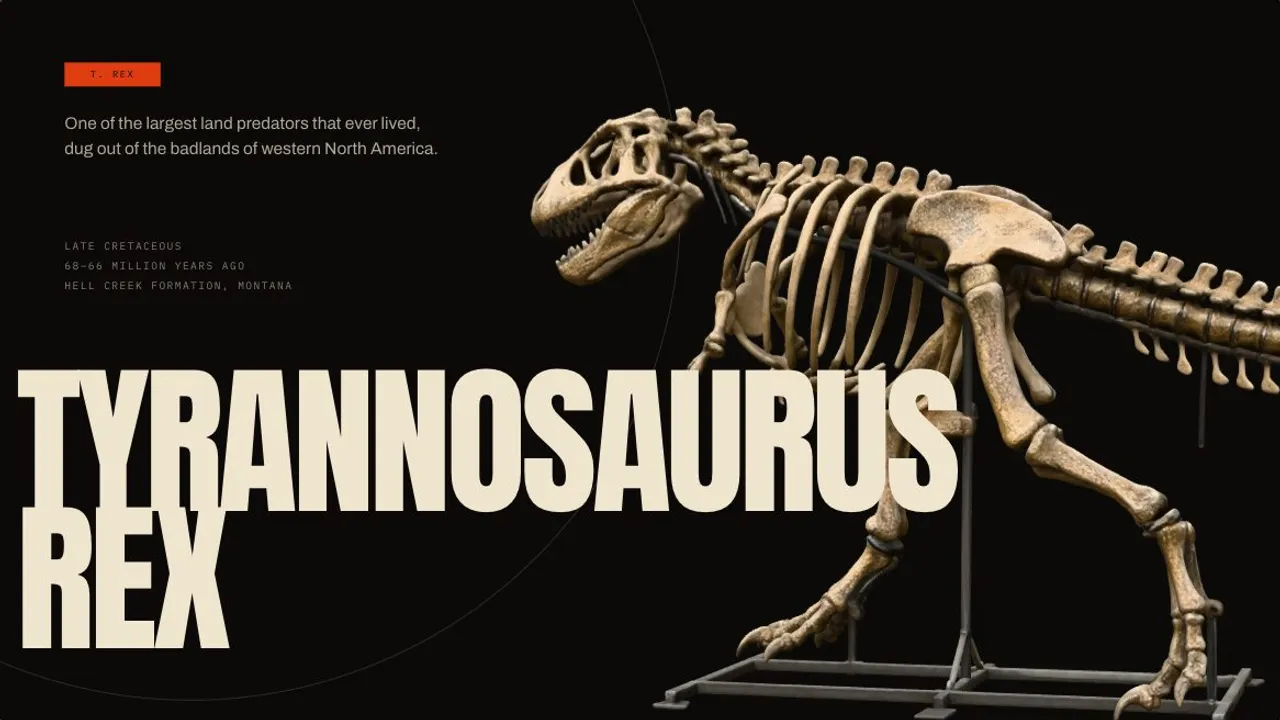 Slide 1 of 8
- 1 sentenceas the brief
- 8 slideswith one 3D object
- ≈ 4 minuntil the object stands
- Native 3Din the PowerPoint export
Slaide builds presentations with AI, and on the Pro and Max plans it models one custom 3D object per presentation. You turn on 3D, describe the object, pick one of two pictures, and about 4 minutes later it stands textured on your slides. In the PowerPoint download it is a real 3D model, the same as Insert > 3D Models, which you rotate and which moves from slide to slide with Morph. One object costs about 130 credits.
How it works
From a sentence to an object, in four steps.
Turn on 3D
Click 3D in the brief box. The switch applies to this document and shows what an object costs when you hover over it.
Describe the object
Say what it is and what matters: type, material, colors, parts. Or upload a photo of your product and say the object should be made from it.
Pick a picture
Slaide paints two proposals. You pick one, or describe a change and have it painted again. The slides are already being built meanwhile.
The object lands on the slides
About 4 minutes later the 3D model stands on the slides it fits, each at its own angle.
Full guide in the help center
Insert a 3D model in PowerPoint
Two ways to a 3D model on your slide.
PowerPoint can show and rotate 3D models. It needs a finished 3D file for that, and that file is usually what's missing. Slaide makes it for you.
| Step | By hand in PowerPoint | With Slaide |
|---|---|---|
| The model | Find a 3D file, buy one, or have it built in a 3D program. | Slaide models the object from your brief or your photo. |
| Onto the slide | Insert the file with Insert > 3D Models, set size and position on each slide. | Slaide places it on the slides it fits, each at its own angle. |
| Motion | Duplicate slides, turn the model on each, set a Morph transition. | The angles already differ; with Morph the camera moves around the object. |
| The slides around it | Design them yourself. | Made in the same run: text, images, layout. |
3D objects come with the Pro and Max plans. In the PowerPoint download the object is a native 3D model you keep rotating there. Details in the help center.
What it does
An object you can turn.
Rotate in the editor
Drag the object with the mouse: sideways turns it, up and down tilts it. The mouse wheel brings it closer, and Undo takes the angle back in one step.
Real 3D in PowerPoint
In the download the object is a native PowerPoint 3D model. You keep turning it there, without Slaide and without internet.
3D in the PowerPoint exportMorph as a camera move
When the object stands on two slides at different angles, PowerPoint plays the Morph transition as a move around the object.
Rotatable in the share link
Anyone who opens the link to your presentation sees the real object and can turn it. When you present from Slaide, it is live on the slide.
From your own photo
A photo of your product, your machine, your model is enough. Slaide then builds the 3D object from your real item.
Reuse at no cost
Every object you make stays in your library. In a new presentation you bring it back for free.
To try it
Three briefs with a 3D object.
Put a brief into the box below. After signing up you turn on 3D (Pro or Max), and Slaide builds the deck with the object.
Product
Launching a cargo bike
Create an eight-slide pitch deck for our electric cargo bike for city logistics: problem, solution, market, business model, team. As 3D object: the cargo bike from a side angle, matte dark green frame, front box made of light wood, wide balloon tires. Show it on the title slide and on the product slide from another angle.
Engineering
How a heat pump works
Build a seven-slide training presentation that explains how an air-to-water heat pump works: cycle, components, efficiency, installation. As 3D object: the outdoor unit of a heat pump, white metal housing, large fan with a protective grille, connections on the side.
Education
Tyrannosaurus rex
Create an eight-slide presentation for a 7th grade class about Tyrannosaurus rex: size, anatomy, senses, diet, extinction. As 3D object: the skeleton of a Tyrannosaurus rex on a museum mount, bones in warm brown, the jaws slightly open. Show it on every slide from the angle that fits the topic.
Everywhere
Where the object stays 3D.
| Where | What you see |
|---|---|
| Slaide editor | The object at each slide's angle, rotatable with the mouse |
| Presenting from Slaide | The live 3D object, moving between slides too |
| Share link | The real, turnable object for everyone with the link |
| PowerPoint (.pptx) | A native 3D model, rotatable, with Morph between slides |
| Keynote, Google Slides, LibreOffice | A still picture of the object at the slide's angle |
PowerPoint shows the 3D model in versions that support 3D models (Insert > 3D Models). Other apps show the still picture that the file keeps behind the model.
Use cases
When a 3D object is worth it.
When the thing itself is the story
- Product and sales: show the product from every side before a photo studio has seen it, in the pitch, in the proposal, at the trade fair.
- Engineering and training: a machine, a part, a device that turns from slide to slide so the part you explain faces the audience.
- Architecture and real estate: a building or a model on the title slide that appears from another direction on the location slide.
- Teaching and museums: a fossil, a vehicle, a sculpture that a class looks at from all sides.
What it is not
Not a CAD tool: the object is a textured display model, not a dimensionally accurate design. A presentation holds one 3D object, which can stand on several slides. Moving parts such as wheels turn with Morph in PowerPoint but do not run by themselves.
At a glance
Plan, cost and time.
- Cost per object
- about 130 credits, on top of the presentation
- Time
- about 4 minutes after the picture choice, the slides build in parallel
- Objects per presentation
- one, on as many slides as you like, each at its own angle
- Reuse
- free in every further document
Keep reading
Common questions
Questions about 3D models in PowerPoint.
How do I get a 3D model into PowerPoint without modeling it myself?
With Slaide you describe the object in your brief and turn on 3D. Slaide models it, places it on your slides, and in the PowerPoint download it is a real 3D model. It works on the Pro and Max plans and takes about 4 minutes.
Can I rotate the 3D model in PowerPoint?
Yes. The object is a native PowerPoint 3D model, the same as Insert > 3D Models. Select it and turn it with the rotate symbol in its middle. PowerPoint opens it at the angle you set in the Slaide editor.
How much does a 3D object cost?
About 130 credits, on top of the credits for the presentation. New picture proposals cost a few credits per round, and an object you already made is free in another document. Credits are included in Pro and Max.
Can I turn my own product into a 3D model?
Yes. Upload a photo that shows the item whole, ideally on a plain background, and say in your brief that the 3D object should be made from it. Slaide then builds the model from your photo.
Does the object move between slides?
Yes. When you present from Slaide, and in the PowerPoint export with a Morph transition, the object changes its angle as a move around it instead of jumping.
Does it work in Google Slides or Keynote?
There you see a still picture of the object at each slide's angle, because these apps do not show PowerPoint 3D models. It is rotatable in the Slaide editor, in the share link and in PowerPoint.
Why is the 3D switch greyed out for me?
3D objects are part of Pro and Max. On Free and Plus the switch stays visible but greyed out. Clicking it shows what Pro adds, and you can upgrade from there.
Build your presentation with a 3D object.
Describe your presentation and the object, or use a brief from above. How the picture choice and the export work is in the help center.
Start for free, no credit card. 3D objects come with Pro and Max.