Product help
Editing and undo: change one thing, keep the rest
A finished draft is a starting point. Correct it by hand, let the AI rework a single area, ask for a focused change in the chat, and go back whenever a change was not right.
Free: 1 document, plan up to 12 pages, first 3 built, no credit card. Plans from €7.99/mo

In Slaide you edit a page by clicking an object and typing or moving it, you change one area with AI by dragging over it, and you ask for larger changes in the chat. Manual edits are undone with Cmd+Z or Ctrl+Z. Before every AI change Slaide saves the document, and the Versions tab restores an earlier state after a preview.
Three ways to change a page
Pick the smallest tool that does the job. It keeps the rest of the document as it is.
| Way | How | Good for |
|---|---|---|
| Edit directly | Click an object on the page. Type into text, drag to move, use the handles to resize or rotate. | Typos, a number, a shorter heading, moving a box. |
| Rework an area with AI | Drag over an area of the page, then describe the change or pick Shorter, Clearer, As chart or Polish. Review the result, then Accept or Discard. | One paragraph, one table, one card that should read or look different. |
| Ask in the chat | Write the change in the message box of the assistant panel. Name the page, for example “Slide 7: …”. | Changes across a slide or several slides, new slides, research. |
The first time you open a finished document, a hint over the page reads “Click any object to edit it directly, or drag over an area to change it with AI”. That sums up the editor. Right-clicking a page offers “Reference page n in chat”, which puts the page into your next message so you do not have to describe where the change belongs.
The usual shortcuts work while you edit: Cmd+A or Ctrl+A selects all objects on the page, Cmd+G or Ctrl+G groups them, Shift with G ungroups them. Under each slide there is a field for speaker notes. Only you see them, and the PowerPoint export writes them into the notes of the slide.
Focused requests in the chat
A good request names the place and the result. Slaide then changes that place and leaves the rest alone.
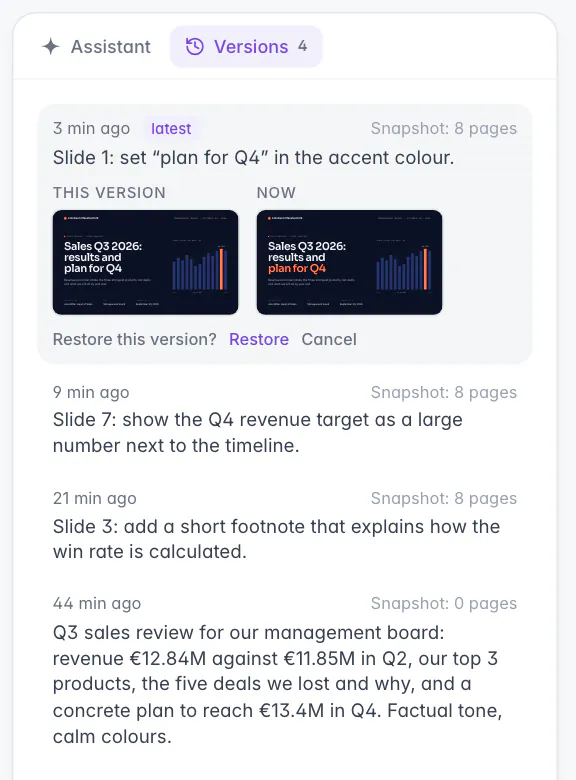
The conversation in the assistant panel keeps every request and the reply that says what was changed. In the screenshot above, three follow-up requests each changed one slide: a footnote on slide 3, a large target figure on slide 7, a highlighted title on slide 1. Each of them created a version you can go back to.
One element
Slide 3: add a short footnote that explains how the win rate is calculated.
Start with this promptOne slide
Slide 7: show the Q4 revenue target as a large number next to the timeline.
Start with this promptAcross the deck
Use “customers” instead of “clients” on all slides and keep everything else.
Start with this promptStructure
Move the slide with the lost deals before the product slide and update the agenda.
Start with this prompt
Undo and restore
Two safety nets: undo for your own edits, versions for every AI change.
Manual edits are undone the way you know it from other programs: Cmd+Z on a Mac, Ctrl+Z on Windows. Shift+Cmd+Z or Ctrl+Y redoes them.
Before every AI change, and before pages are added, deleted or moved, Slaide saves the current state of the document. The Versions tab in the assistant panel lists these states with the time, the request that led to the change and the number of pages.
Click a version to open it. You see the first page of that version next to the current one. Restore asks once more before it replaces the document, so nothing is replaced by a single accidental click. Restoring brings back all pages, the title and the format of that state.
Pages, notes and spreadsheets
The smaller controls around the page that save a request.
| Control | What it does |
|---|---|
| + Slide under the page strip | Puts “Add a new slide after slide n about:” into the message box. Finish the sentence and send it. |
| Right-click on a page | Offers Reference page n in chat, Edit whole page with AI and Edit directly. |
| Speaker notes under a slide | What you say on this slide. Only you see it, and the PowerPoint export puts it into the notes pane. |
| Excel model | Opens as a grid. Select a cell to edit its value or formula, or ask the assistant to restyle the sheet. |
| On a phone | Tapping an object offers Edit text, Replace image, Move and Ask AI. |
Limits
What editing and versions do not do.
FAQ
Anything missing? Ask us
Can I edit the document myself?
Yes. Click a text on the page and type. Select an object to move, resize or rotate it, and use the usual shortcuts for undo and redo. You do not need to ask the AI for small corrections.
Can I ask Slaide to change only one part?
Yes. Drag over an area of a page and say what should change, or pick a quick action such as Shorter or Clearer. You see the result first and accept or discard it. In the chat, name the page and the element, for example “Slide 4: shorten the second bullet”.
How do I undo a change?
A manual edit is undone with Cmd+Z on a Mac or Ctrl+Z on Windows, and redone with Shift+Cmd+Z or Ctrl+Y. For AI changes, open the Versions tab: Slaide saves the document before every AI change, and you can restore an earlier state after a preview.
What does restoring a version do?
It brings back the whole document as it was before that change: all pages, the title and the format. Before you confirm, you see the first page of that version next to the current one. Restoring is itself saved, so you can go forward again.
How many versions does Slaide keep?
The most recent 50 versions of a document. Older ones drop out of the list.
Start with a finished draft, then make it yours
Your first document is free, with the first 3 pages built. Edit it by hand or by request.