Product help
Web research and sources: current facts you can check
When a document depends on current public facts, Slaide searches the web for them, builds only on findings it could back up and lists every source in the editor.
Free: 1 document, plan up to 12 pages, first 3 built, no credit card. Plans from €7.99/mo
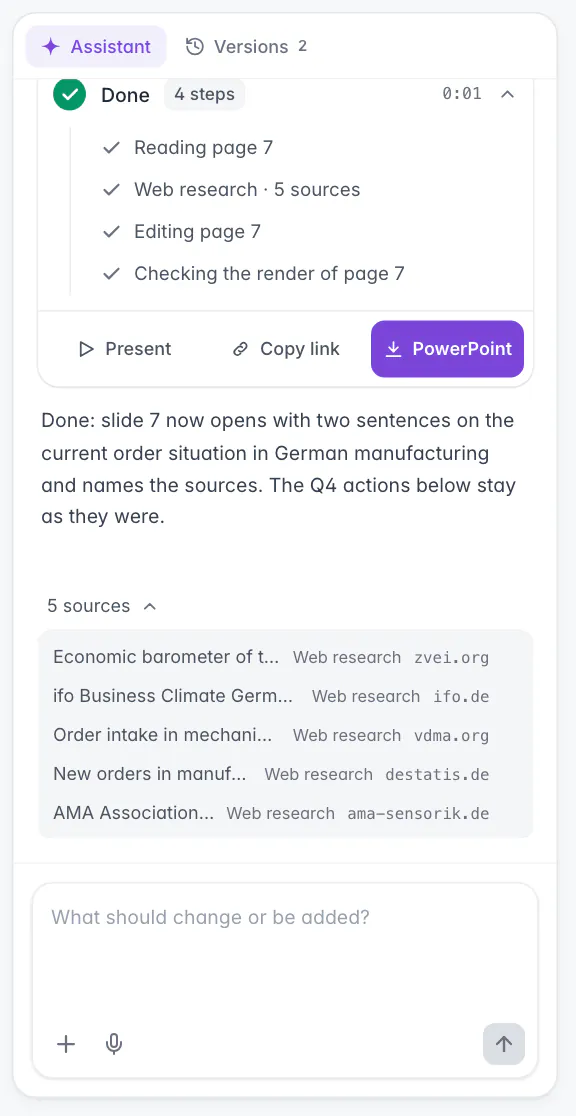
Slaide searches the web when a document needs current or unfamiliar public facts, not for every request. You see the research as a step in the assistant panel and, after the run, a list of all sources with title and domain. Only findings that research could back up may carry claims in the document. Sources are not placed on the slides automatically; ask for footnotes or a sources slide if you need them.
When Slaide researches
Research is a tool for a specific gap, not a crawl before every document.
Slaide decides during the run whether a claim needs current evidence. Typical cases are market figures, prices, legal rules, deadlines, specifications and companies or products it does not know well. Stable general knowledge is not researched, and neither is content that comes from your brief or your files.
When Slaide researches, it asks a few focused questions, searches the web for each of them and reads the relevant pages. Then it goes back to the document. You can also ask for research yourself, in the first request or in any later change.
Searches never contain your private material word for word. If your brief mentions a customer or an internal figure, the search asks the general public question behind it instead.
Current figures
Slide 4: replace the market figures with the latest public numbers and name the source in a footnote.
Start with this promptCheck a claim
Check the statement on slide 2 about the new EU rules against current sources and correct it if needed.
Start with this promptSources slide
Add a last slide that lists all sources used in this deck.
Start with this prompt
What you see in the editor
The research is visible while it happens and afterwards.
During the run, the assistant panel shows the research as a step, first as “Researching” with the topic and then as “Web research” with the number of sources found so far. The search queries appear in the activity while they run.
After the run, the steps are summarised in the “Done” card, and the list of sources sits under the conversation. It is folded to one line, such as “5 sources”, and opens with a click. Each entry shows the title of the page, how it was found and its domain, and a click opens the page in a new tab.
The sources are stored with the document, the most recent 50 of them, and they are part of every saved version. When you come back later, the list is still there.
The example in the screenshot
One follow-up request with research, on a finished sales review of a fictional company.
The request was: “Slide 7: open the Q4 plan with the current order situation in German manufacturing and name the sources.” The figures of the company itself were already in the deck. What was missing was public context, so Slaide researched it.
The run shows four steps. Reading page 7 looks at the slide as it is. Web research with 5 sources collects the public context. Editing page 7 writes it onto the slide, and Checking the render of page 7 looks at the result. The reply then says what changed and what stayed as it was.
Under the reply, the folded line “5 sources” opens the list: public statistics and industry bodies in this example, each marked Web research and shown with its domain. The list stays with the document, so it is still there when you open the deck next week.
Where a source comes from
The label next to each source says how it got into the document.
| Label in the list | Meaning |
|---|---|
| Web research | Found by Slaide's own web search during the run. |
| From your link | A link from your first request, read before planning. |
| Directly read | A page Slaide opened on purpose during the run, for example a link from a later request or a source it wanted to read in full. |
| Web source | A web page that reached the document another way, for example from the Chrome extension. |
How findings are checked
Research results are not all treated the same. Only backed-up findings may carry a claim.
Every research step ends with a status. Usable means the findings are backed by the sources and may be used in the document. Partial means the research left open points, and empty means it found nothing reliable. Slaide is instructed not to use claims from partial or empty research as facts, and to either ask a narrower follow-up question or work only with what you supplied.
Slaide is also instructed not to turn vague wording into numbers: if a source says “several” or “significant”, that must not become a percentage on a slide. Where sources contradict each other, it is told to state the conflict instead of merging the figures, and for a decisive claim to read the relevant passage of the source itself.
In the source list, a source from research that was not usable is marked “not usable as evidence” when you point at it.
Limits
What web research does not do.
FAQ
Anything missing? Ask us
Does Slaide research every request?
No. Slaide searches the web when a document depends on current or unfamiliar public facts, such as market figures, prices, rules or recent developments. For stable general knowledge, and for content that comes from your own files, it does not search.
Can I ask for research explicitly?
Yes. Say it in the request, for example “with current figures and sources” or “check the market data on slide 4 against current sources”. This works in the first request and in later changes.
Where do I see the sources?
In the assistant panel. During the run you see the research as a step with the number of sources. After the run the list sits under the conversation: each source with its title, how it was found and its domain. A click opens the page.
Are the sources written onto the slides?
Not automatically. When Slaide uses researched facts it usually names the source briefly in a footnote. If you need a source line on every slide or a sources slide at the end, ask for it in the request.
Does Slaide send my files to a search engine?
No. Searches are phrased as general public questions. Slaide is instructed never to put private context such as your uploads, customer names or internal figures word for word into a web search.
What happens with a link I paste?
Links in the first request of a document are read before planning, up to three. In later requests Slaide opens a link when the change needs it. In the source list these pages are marked “From your link” or “Directly read”.
A document with current facts and visible sources
Your first document is free, with the first 3 pages built. Ask for current figures and sources in the brief.